
How to Check SIM Owner Details in Pakistan: Step-by-Step Guide
Want to check SIM owner details in Pakistan? · 1. Go to PMD Portal or SMS 668 · 2. Enter CNIC · 3. Submit or Send · Want to block unknown Sim?
To begin with, we want to address that you can only check sim owner details of your own Sim cards safely. Reason is, in Pakistan we can have upto 5 SIM cards and sometime it is hard to remember all numbers owned or the SIM Network Provider. That is why you can check SIM owner details in Pakistan legally. Also their are some other third party application which offers to check SIM details online but they are not legally approved by PTA and gets your personal information from you and sells it off the market. We do not encourage anyone to use such third party app to check others sim details as it puts your own personal data at risk.0
In this guide, we will show you all the official methods (SMS, USSD, online portal, and app) to check SIM owner details, how to block unauthorized SIMs, and why it matters for your safety.
In a Hurry to know SIM Owner Details? Follow These 4 Quick Steps:
- Go to CNIC.SIM.PK (SIM Information System).
- Enter 13 digit CNIC number (without dashes).
- Complete the CAPTCHA to verify you are not a robot.
- Click “Submit” to view all SIMs registered.
Why Trust Pakera.pk?
At Pakistan Era, we only share information which is true, clear and tested by ourselve. Everything we publish is thoroughly checked, so you can trust what you read at our platform. Our main goal is to keep things simple and reliable. We make sure that you get the best and most accurate facts to make the best decision or understand a topic!
Why Check SIM Owner Details?
To protect identity, verify ownership, and avoid misuse of mobile number registered under your name. In Pakistan, checking SIM owner details is smart and important for mobile security. Here is why it matters:
- Prevent Fraud & Identity TheftCriminals sometimes misuse unverified SIMs.
- Verify Unknown CallersConfirm if the number really belongs to who they claim.
- Manage Family SIMsKeep track of SIMs under your CNIC and your dependents.
- Stay Compliant with PTA RulesPTA requires all SIMs to be biometric-verified.
- Correct Registration MistakesSometimes SIMs are wrongly linked to your CNIC.
3 Quick Methods to Check Sim Owner Details Online in Pakistan
1. PMD (Pakistan Mobile Database) Online Portal
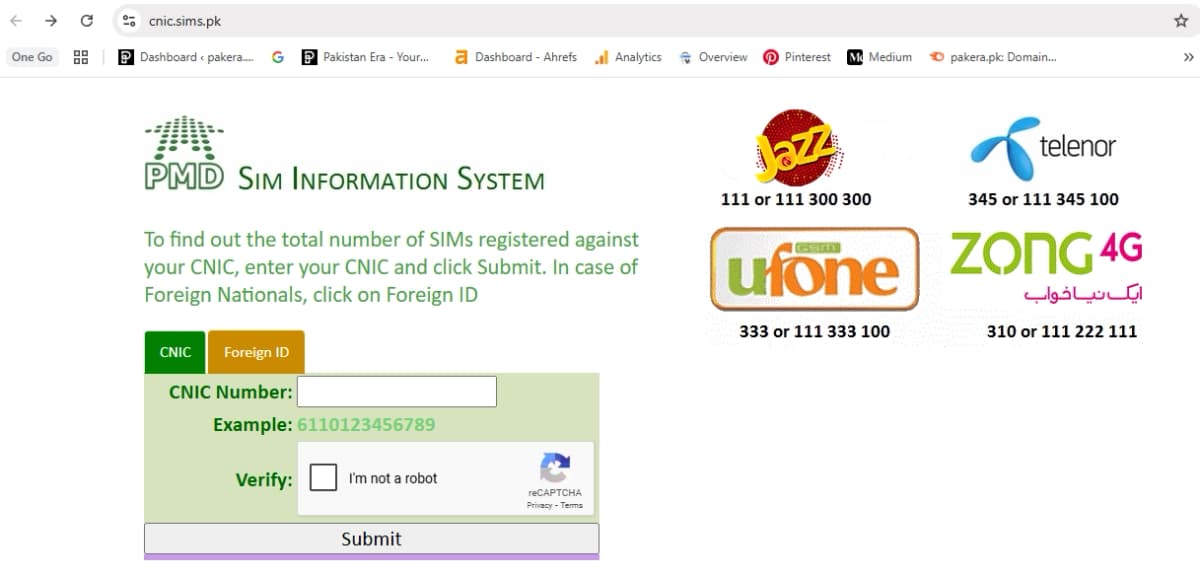
- Go to the PMD SIM Information System Portal.
- Enter the 13-digit CNIC number.
- Type in the mobile number you want to check.
- Fill in the CAPTCHA and click "Verify."
- The system shows all SIMs registered under your CNIC.
Note: It only shows the number of SIMs linked to your CNIC, not the full name of owners.
2. SMS to 668 (PTA SIM Verification)
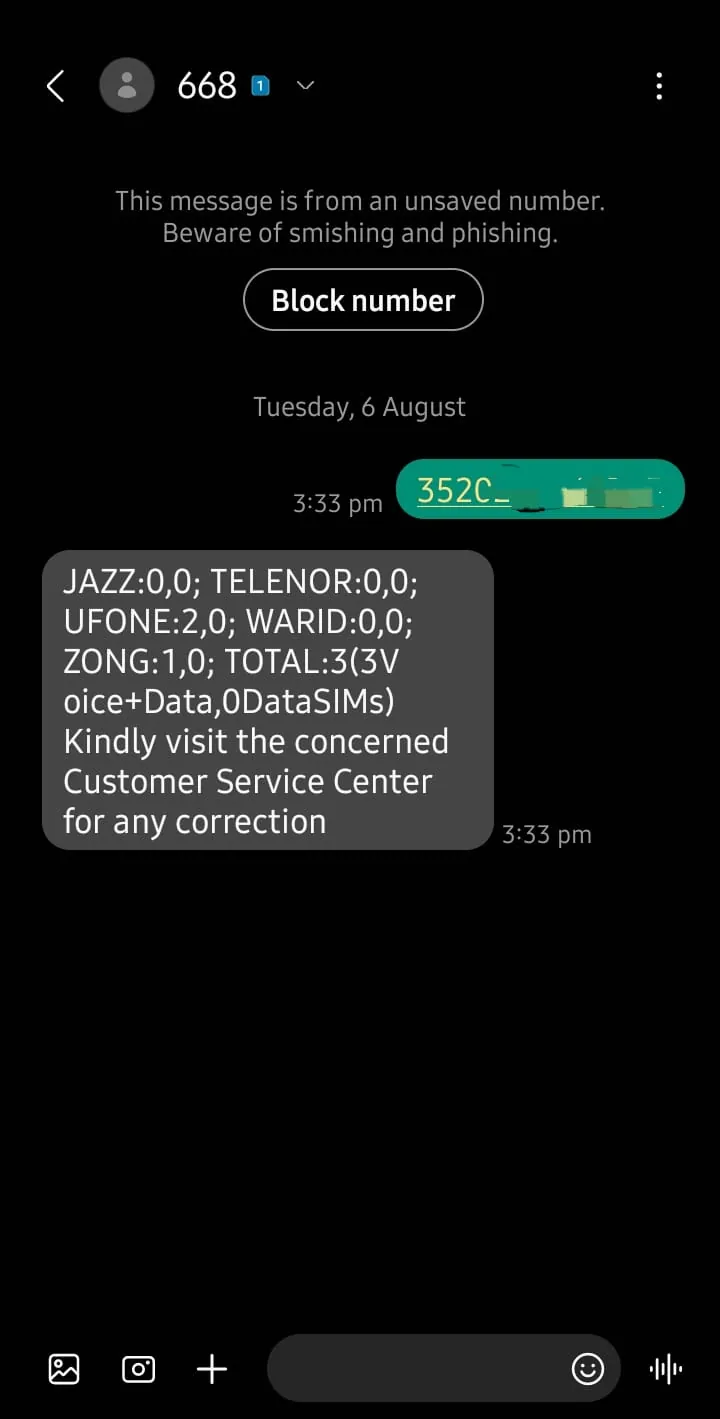
- Open phone messaging app.
- Type 13-digit CNIC number (no dashes or spaces).
- Send to 668.
You will get a reply with the number of SIMs registered per network (Jazz, Zong, Telenor, Ufone).
Example Reply you will recieve:
Jazz: 2
Zong: 1
Telenor: 0
Ufone: 2
Note: No owner name is disclosed, only the count of SIMs per network.
3. SMS “MNP” to 667
This is a lesser-known but useful method.
- Send MNP to 667 from any SIM.
- You will get details like:
- SIM Owner’s Name
- CNIC Number
- Activation Date
This helps when you want to verify the exact owner of a number.
4. *Dial 336# USSD Code
Another shortcut is dialing *336# and following on-screen instructions.
- You’ll get SIM registration details including name and CNIC.
- Dial *336#
- Select the option for SIM verification.
5. PMD Mobile App
The PMD mobile app also allows you to:
- Check how many SIMs are registered on CNIC.
- Verify SIM ownership.
- View portability status of numbers.
This method is more convenient than SMS if you use smartphones.
6. Customer Helplines
If you can not find the sim detail online, call your network provider helpline for customer support. Ask them to help you verify SIM owner details after confirming your identity with CNIC and other details.
Customer Support Helplines:
How to block or remove unauthorized SIMs
To block/remove unauthorized SIMs, visit nearest mobile operator service center with original CNIC. They can help you:
- Print SIM ownership record
- Reverify biometric data
- Block unknown SIMs
- Update SIM registration
Note: As of now, there is no online method to Remove Sim Online
Legal Considerations While Checking Sim Owner Details
- It is legal to check SIMs under your own CNIC.
- It is illegal to check someone else SIM ownership details without consent.
- Always use PTA-approved methods and avoid shady apps/websites.
Benefits of Online SIM Checking
- Peace of Mind → Keeps your identity safe from misuse.
- Quick & Free → SMS and portals take seconds.
- Accessible Anywhere → No need to visit a service center for simple checks.
- Secure → Ensures your SIM records are correct and updated.
Note: Beware of fake apps and websites, always use official PTA/PMD methods only.
Quick FAQs
How to check SIM owner details online in Pakistan?
Is there any app for checking SIMs?
Is it illegal to check someone else SIM details?
What should I do if SIM registration details are incorrect?
How to check number of SIMs registered under CNIC?
Can I block a SIM online?
📢 Want exclusive content, quick updates, and alerts straight to phone? Join Pakistan Era WhatsApp Channel for free.
About the author

Author
Fajr Riaz is a well-talented author at Pakera.pk with expertise in creative content creation/writing and storytelling. Fajr's strength lies in creating engaging articles, detailed guides, and straight narratives that connect with readers and give meaningful insights. With her accurate attention to detail and passion for writing, Fajr has established herself as a pivotal pillar at Pakera and is invaluable.



