
How to Delete Easypaisa Account Permanently in 2026
Delete your Easypaisa account permanently by calling 3737, or block it temporarily from the app. Here is what happens to your balance, CNIC and history.
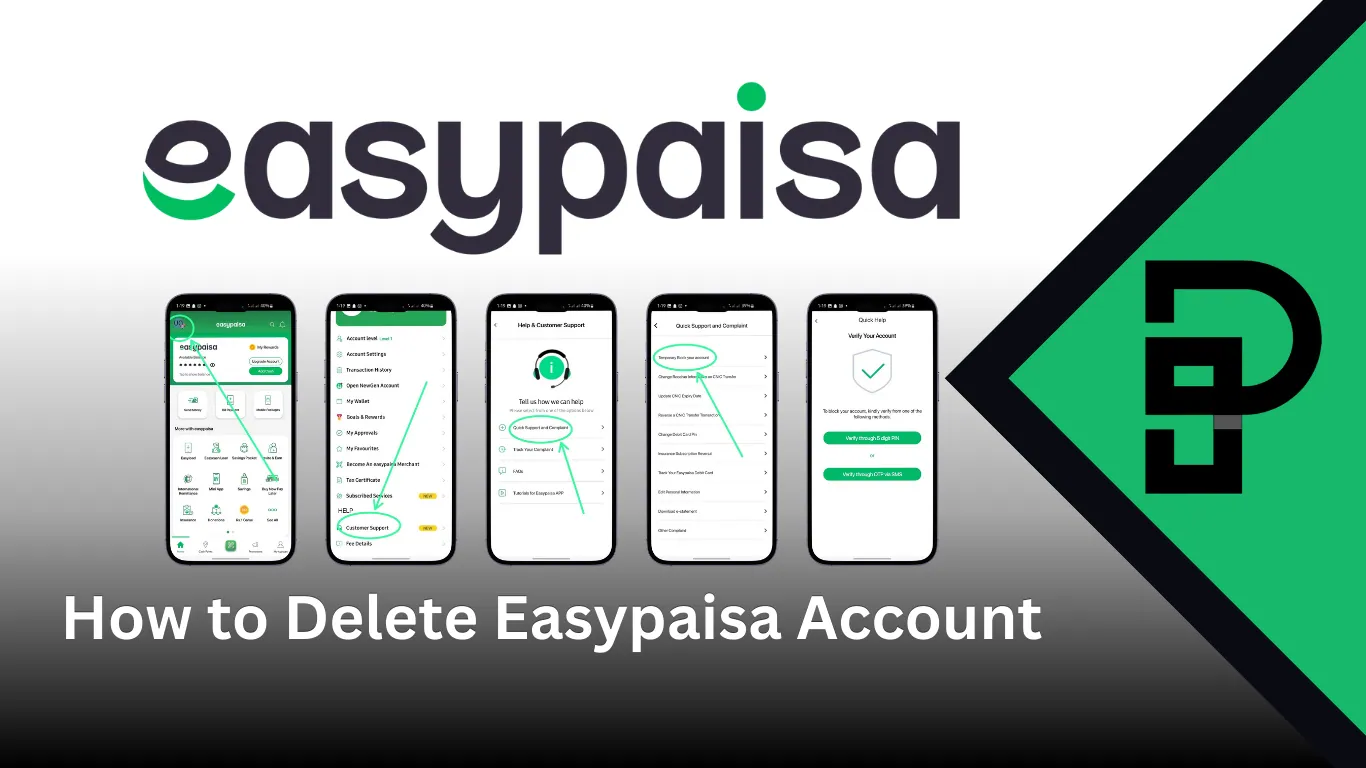
There is no delete button. People hunt through the Easypaisa app for twenty minutes looking for one, then give up and assume the account is stuck with them forever. To delete an Easypaisa account you have to ask a human, and the request goes through the helpline rather than any screen in the app.
Mobile wallets are not a small corner of Pakistani banking any more. Branchless banking sits under State Bank of Pakistan regulation, every account is tied to a CNIC, and that is precisely why closure is handled by a verified human request instead of a tap.
Here is the actual process, what happens to your money and your CNIC afterwards, and the temporary block that is often the better choice.
How to delete Easypaisa account permanently?
Call 3737 from the registered mobile number, ask the agent for permanent account closure, and verify your identity with your CNIC and security questions. Withdraw your balance first, because a closure request on an account holding money gets refused.
Keep the complaint or reference number the agent gives you. Without it you have no way to chase the request if the account is still live a week later.
- Move your entire balance out, down to zero, by transferring it or withdrawing at an agent shop.
- Call 3737 from the registered SIM. Calling from another number wastes the trip.
- Ask specifically for permanent closure, not deactivation, or you will get a temporary block instead.
- Answer the identity questions: CNIC number, mother's name, recent transaction details.
- Write down the reference number before ending the call.
- Check after five to seven working days that login is refused.
Can you delete an Easypaisa account from the app?
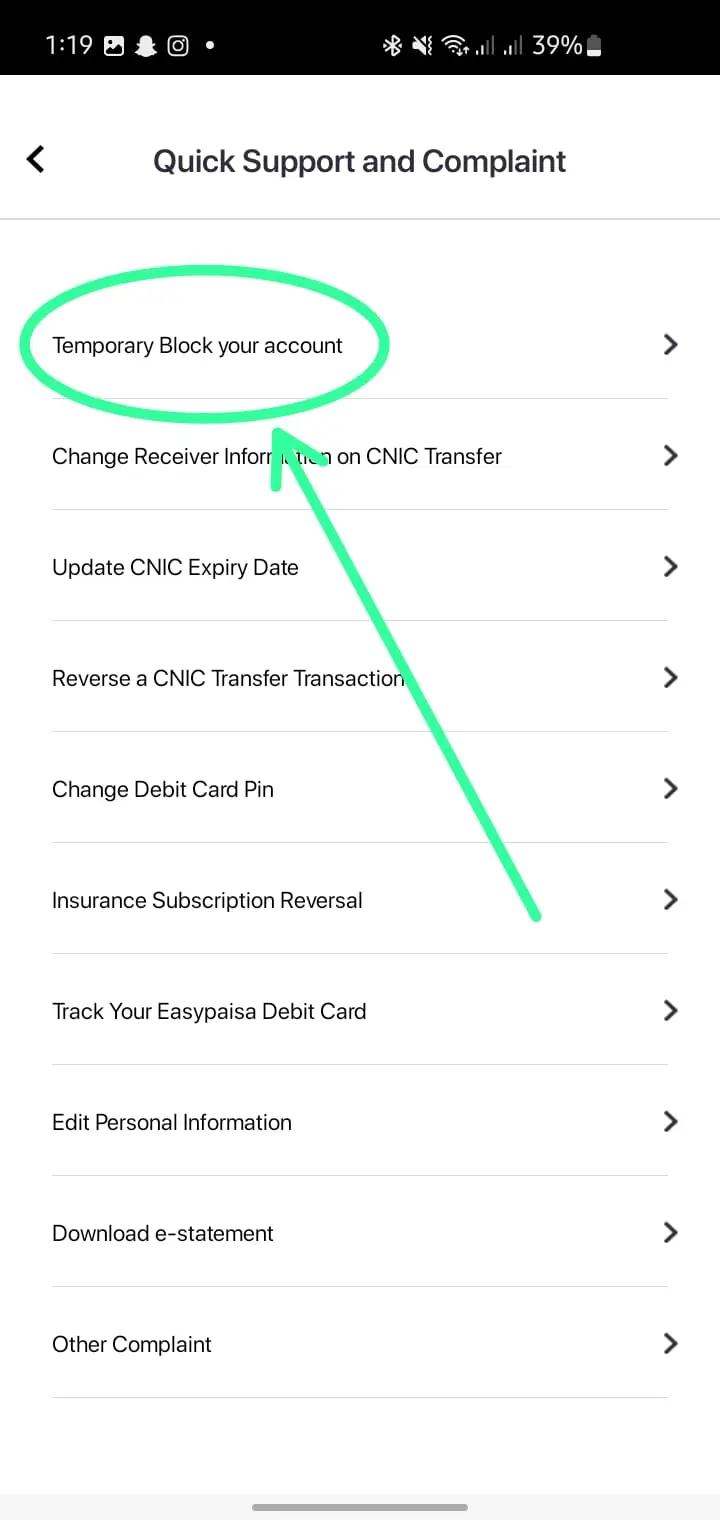
Not permanently. The app can temporarily block your account through Customer Support, which freezes transactions and login. Permanent deletion has to come from the helpline or a written request through the contact form on the Easypaisa website.
The block is genuinely useful in the situations most people are actually in: a lost phone, a suspected compromise, or wanting to stop using the wallet without closing it forever.
- Open the Easypaisa app and tap the menu icon on the home screen.
- Select Customer Support.
- Choose the complaint or account issue section.
- Pick the temporary block option and confirm with your PIN or OTP.
A blocked account can be restored by calling 3737 and passing verification. A deleted one cannot. That difference is worth thinking about for more than a minute before you commit.
What happens to your balance when you close an Easypaisa account?
Nothing automatic. Easypaisa will not close an account with a balance sitting in it, so the money must be out before the request is processed. Transfer it to a bank account, send it to another wallet, or withdraw cash at a retailer.
Any pending transaction also blocks closure. If you have sent money that has not settled, wait for it to clear first.
| Before you close | Why it matters |
|---|---|
| Balance is zero | Closure is refused while funds remain |
| No pending transfers | Unsettled transactions hold the account open |
| Linked bank accounts removed | Prevents failed auto-debits later |
| Statement downloaded | Transaction history is not accessible afterwards |
| Bills and subscriptions moved | Anything paying through the wallet will start failing |
Download your statement before you call. Once the account is closed, your transaction history goes with it, and reconstructing a year of payments from memory is not something you want to attempt at tax time.
How do you remove your CNIC from an Easypaisa account?
Closing the account releases the CNIC. Easypaisa allows one wallet per CNIC per provider, so if you want to open a fresh account, or someone opened one on your CNIC without permission, the existing account must be closed first through 3737.
The unauthorised case comes up more than it should. If an account exists on your CNIC that you never opened, say that explicitly on the call, because it is handled as a fraud complaint rather than a routine closure and moves faster.
Worth checking the rest of your identity footprint at the same time. Our guide on checking SIMs registered on your CNIC shows how to see what else is in your name, and reporting an unknown SIM covers what to do about it.
How long does Easypaisa account deletion take?
Usually five to seven working days from a verified request. Simple closures sometimes complete in two or three. Anything flagged for review, such as a fraud complaint or an unresolved dispute, takes longer and no agent will give you a firm date.
You will not always get a confirmation message. The reliable test is trying to log in. If the app refuses your credentials and the helpline confirms no account exists on the number, it is done.
Chase it at day eight with your reference number if nothing has changed. Requests do get lost.
Should you delete or just block your Easypaisa account?
Block it if you might come back, if your phone was lost, or if you just want to stop using it. Delete it if you need the CNIC freed for a new account, or you want the data gone. Blocking is reversible and takes minutes. Deletion is neither.
Most people asking how to delete Easypaisa account permanently actually want one of the reversible options instead.
| Your situation | Better choice |
|---|---|
| Phone lost or stolen | Temporary block, immediately |
| Not using the wallet any more | Withdraw balance and leave it dormant |
| Suspected unauthorised access | Block first, then call 3737 to investigate |
| Need the CNIC for a new account | Permanent closure |
| Changing your mobile number | Number update, not closure |
| Account already blocked and unusable | Recovery, not deletion |
If your account is blocked and you want it back rather than gone, our guide on recovering a blocked Easypaisa account covers the verification steps. Forgotten PIN is a separate and much easier fix, explained in recovering a forgotten Easypaisa MPIN.
How do you remove the Easypaisa account from your phone?
Uninstalling the app removes it from the device only. Your account keeps existing on Easypaisa's servers, your balance stays where it is, and the CNIC remains tied to it. Log out first if you are handing the phone on.
People conflate these two constantly. Deleting an app is a housekeeping action. Closing an account is a banking action. Only the second one ends the relationship.
Before selling or giving away a phone: log out of the app, remove the account from the device, then uninstall. If the phone is already gone, call 3737 and have the account blocked the same day.
Can you reopen a deleted Easypaisa account?
No. Permanent closure is final, and your old transaction history does not come back with a new account. What you can do is open a fresh Easypaisa account on the same CNIC afterwards, because closing the old one releases it.
The new account starts from zero. No history, no saved beneficiaries, and your transaction limits reset to the entry tier until the account is upgraded again. Our guide on increasing the Easypaisa transaction limit covers that process.
Opening a replacement is straightforward. Creating an Easypaisa account walks through the app registration, and creating one without the app covers the USSD route for feature phones.
Frequently asked questions about deleting an Easypaisa account
How do I delete my Easypaisa account permanently?
Empty the balance, call 3737 from the registered number, and request permanent closure. Verify your identity with your CNIC details and keep the reference number the agent provides.
Can I delete my Easypaisa account online?
You can submit a closure request through the contact form on the Easypaisa website, but it still goes to an agent for verification. The helpline is faster.
Easypaisa account delete karne ka tarika kya hai?
Pehle balance khaali karein, phir registered number se 3737 par call karke permanent closure ki request dein. CNIC verification ke baad account 5 se 7 working days mein band ho jata hai.
Will my money be returned when I close the account?
Only if you withdraw it yourself first. Easypaisa does not process closure on an account that still holds a balance, so the money never gets stranded, but nothing is refunded automatically either.
Can I open a new Easypaisa account on the same CNIC afterwards?
Yes. Closing the old account frees the CNIC, and you can register again. The new account has no history and resets to the entry transaction tier.
Does uninstalling the Easypaisa app close my account?
No. Uninstalling removes the app from your phone only. The account, the balance and the CNIC link all remain active.
What is the difference between blocking and deleting?
A block is temporary and reversible by calling 3737. Deletion is permanent, releases your CNIC, and erases access to your transaction history.
About the author

Author
Fajr Riaz is a well-talented author at Pakera.pk with expertise in creative content creation/writing and storytelling. Fajr's strength lies in creating engaging articles, detailed guides, and straight narratives that connect with readers and give meaningful insights. With her accurate attention to detail and passion for writing, Fajr has established herself as a pivotal pillar at Pakera and is invaluable.



