
Ufone Conference Call Code: Activate Group Calls in 2026
The Ufone conference call code is SUB to 6789. Activate group calling for five numbers, merge calls step by step, and see exactly what each minute costs.

Three cousins, one property dispute, and nobody in the family group has enough data for a WhatsApp call. That is the situation the Ufone conference call code exists for. Send SUB to 6789, and you can put five people on one ordinary phone call with no internet involved at all.
It still matters more than you would think. Pakistan's telecom subscriptions passed 207.2 million by March 2026 according to PTA indicators, but coverage and data quality are nowhere near uniform once you leave the cities. A regular voice call works where a video call stalls.
Below is the activation code, the merge steps that actually work on both Android and iPhone, and what the service costs once tax is applied.
What is the Ufone conference call code?
Send SUB in a text message to 6789 from your Ufone number. You can also dial 333 and ask an agent to enable it, or subscribe through the VAS menu in the UPTCL app. All three routes activate the same service.
Activation is one time. Once the service sits on your number you do not resubscribe every month, and there is no recurring rental for keeping it.
Prepaid and postpaid numbers can both use it. Postpaid customers see the activation charge on their next bill instead of an immediate balance deduction.

How much does the Ufone conference call service cost?
Activation is Rs 3.52 before tax, which works out near Rs 5 once federal excise duty is applied. Keep at least Rs 10 in your balance when you subscribe, because a request sent with less than that fails silently.
The activation fee is the only charge unique to the service. Everything after it is billed as normal calling.
| Item | What you pay |
|---|---|
| One time activation | Rs 3.52 excluding tax, roughly Rs 5 with tax |
| Minimum balance to subscribe | Rs 10 |
| Monthly rental | None |
| Each participant you add | Charged as a separate call at your normal rate |
| Participants allowed | Five, including you |
That fourth row is the part that catches people out. A conference call with four other people is billed as four simultaneous calls, not one. If you have a call bundle covering on-network minutes, the Ufone-to-Ufone legs come out of that bundle and only the off-network legs cost extra.
Before a long group call, check what you are working with. Our guide on checking remaining Ufone minutes shows the codes, and the Ufone Super Card packages include the on-network minute pools that make group calls cheap.
How do you activate Ufone conference call from the UPTCL app?
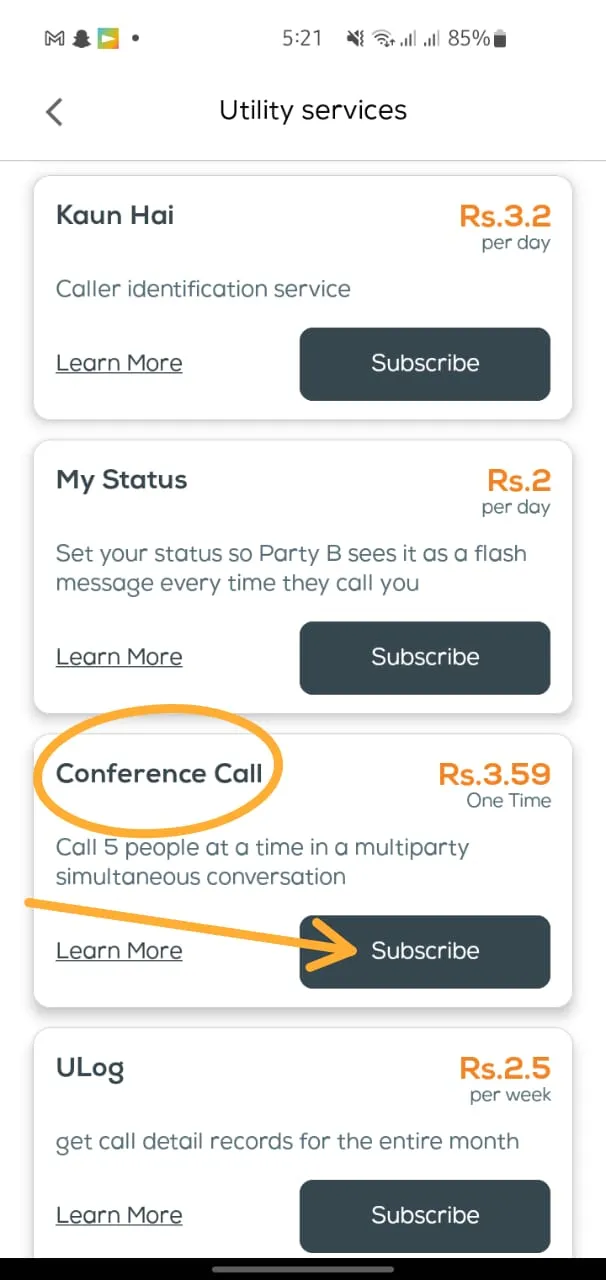
Open the UPTCL app, tap VAS, choose More Services, find Conference Call in the list and tap Subscribe. The app confirms on screen and Ufone follows up with an SMS within a minute or two.
The app route is worth using if you want a record of what you subscribed to and when. It is also the easiest place to unsubscribe later.
- Open the UPTCL app and log in with your Ufone number.
- Tap VAS on the home screen.
- Select More Services to expand the full list.
- Find Conference Call and tap Subscribe.
- Confirm, then wait for the activation SMS before making a call.
New to the app? The UPTCL app guide covers installation and login, including what to do when the OTP never arrives.
How do you make a conference call on Ufone step by step?
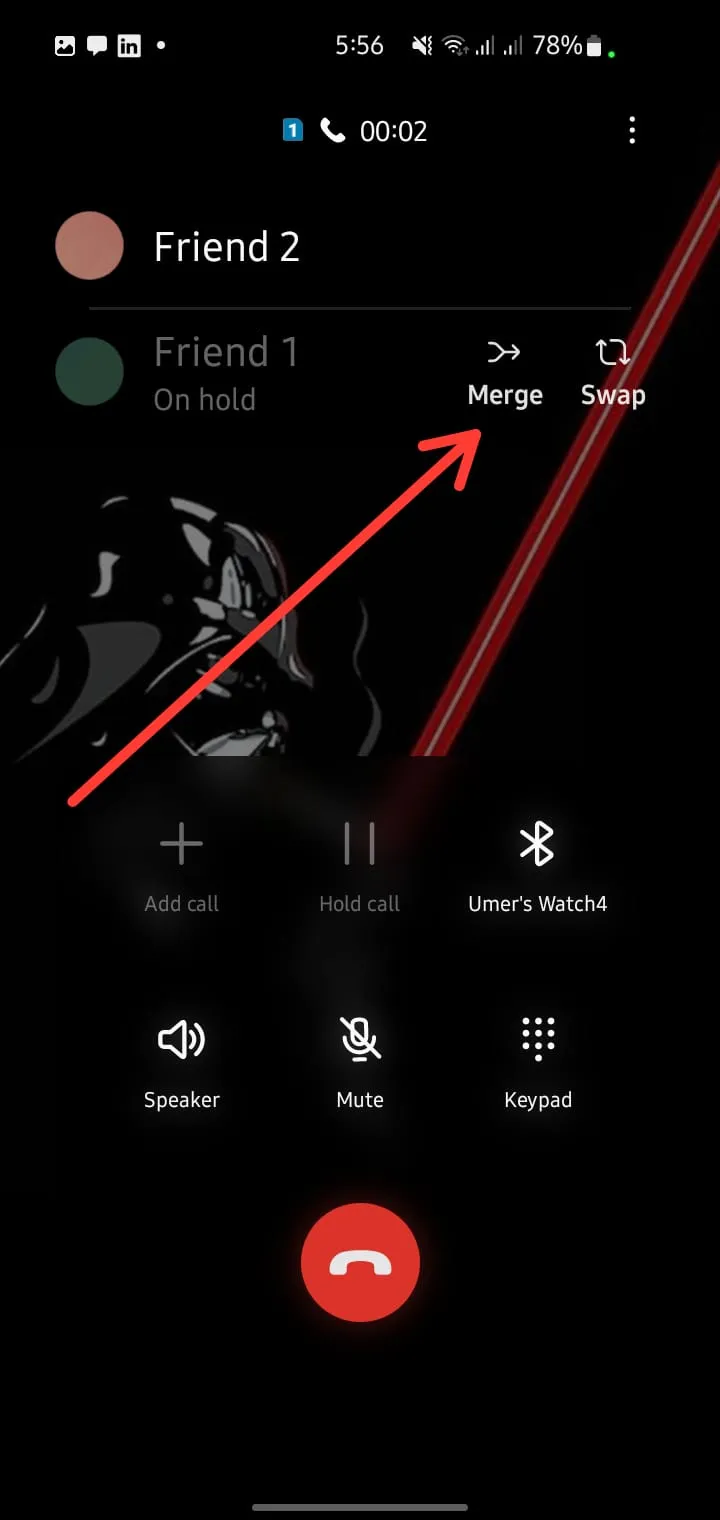
Call the first person normally. Once connected, tap Add call, dial the second number, then tap Merge when they answer. Repeat until five people are on the line. The service must be active before any of this works.
The buttons differ slightly by handset but the sequence never changes: connect, add, dial, merge.
On an Android phone
- Dial the first participant and wait for them to answer.
- Tap Add call. The first call goes on hold automatically.
- Dial the second number, or pick it from contacts.
- When they answer, tap Merge or the merge icon.
- Repeat for participants three, four and five.
On an iPhone
- Dial the first participant.
- Tap add call on the in-call screen.
- Dial the next number and wait for the connection.
- Tap merge calls.
- Tap the i icon next to Conference to drop a single participant without ending the whole call.
You can mix networks freely. Zong, Jazz, Telenor, PTCL landlines and international numbers all join the same call, which is the main reason people pick this over a messaging app when the group is spread across operators.
Why use Ufone conference call instead of WhatsApp?
It runs on the voice network, so it works at one bar of signal with no data at all. Participants do not need smartphones, an app, or an account. Landlines can join. For older relatives and rural connections, that is the whole argument.
WhatsApp is free and it is better when everyone already has decent 4G. I am not going to pretend otherwise.
Where the operator service wins is reliability. Nobody has to install anything. Nobody gets dropped because their data ran out. And the person on a Rs 2,000 feature phone is not excluded from the conversation.
| Ufone conference call | WhatsApp group call | |
|---|---|---|
| Needs internet | No | Yes |
| Works on feature phones | Yes | No |
| Landlines can join | Yes | No |
| Participant limit | 5 | 32 |
| Cost | Standard call rates per leg | Data usage only |
| Setup for participants | None | App and account required |
Why is my Ufone conference call not working?
The usual causes are an unconfirmed subscription, a balance too low for the extra call legs, or a handset where Add call is greyed out because VoLTE is handling the first call. Check the activation SMS first, then your balance.
Work through these in order before calling the helpline.
- No activation SMS. Send SUB to 6789 again. Duplicate requests are not double charged.
- Merge button missing. Some handsets hide it while the first call is on a VoLTE connection. Turn VoLTE off in network settings, place the call again, then turn it back on afterwards.
- Second call fails to connect. Your balance covers one call but not two. Top up, or use a bundle that includes the numbers you are calling.
- Participant dropped after joining. Their network dropped the leg, not yours. Re-add them with Add call and Merge.
- Nothing works at all. Dial 333 and ask an agent to confirm the VAS is provisioned on your number.
If a low balance is the recurring problem, activating the Ufone balance save service stops background data charges eating the credit you were keeping for calls.
How do you unsubscribe from Ufone conference call?
Send UNSUB to 6789, or remove it from the VAS section of the UPTCL app. There is no monthly charge, so most people leave it active. Cancelling only stops the service, it does not refund the activation fee.
Since there is no rental, the only reason to remove it is to keep your VAS list clean. If you are auditing every subscription on the number, our full list of Ufone unsubscribe codes covers the rest.
Frequently asked questions about Ufone conference calling
What is the Ufone conference call activation code?
Send SUB to 6789 from your Ufone number. Dialling 333 and asking an agent, or subscribing through VAS in the UPTCL app, activates the same service.
How many people can join a Ufone conference call?
Five in total, including you. That means four other participants, and they can be on any network or a landline.
Is the Ufone conference call code free?
The code itself is free to send. Activation costs Rs 3.52 before tax, close to Rs 5 with tax applied, and you need Rs 10 in your balance for the request to go through.
Do conference call minutes come out of my call package?
On-network legs use your Ufone-to-Ufone bundle minutes. Calls to other networks are charged at your standard off-network rate unless your bundle includes them.
Can I add an international number to a Ufone conference call?
Yes. International participants join like any other, but that leg is billed at international rates, which are far higher than local ones.
Does conference calling work on a Ufone postpaid number?
Yes. Postpaid works the same way, with the activation fee appearing on your next bill rather than deducting from a prepaid balance.
About the author

Administrator
Umer Kureshi is the Lead Administrator with a strong background in technology and digital marketing. As the Lead Administrator, and Writer at Pakera.pk, Umer manages the website operations, optimizes website content and writes engaging guides on technology and current events happening in Pakistan.



